Slicer Configuration for Orca / Flash Studio
A collection of configurations and settings for Custom Firmware OpenCreator.
New - OrcaSlicer Cloud Profile
For those who do not want to do this manually, we now have an Orca Cloud Profile! Check it out here
OrcaSlicer Plugin
For those who want to replicate FlashForge's send dialogs, you can now use our OrcaSlicer 2.5.0 plugin! Just set it as a slicer pipeline plugin. Check it out here
Print profile
-
Under Quality → Precision, switch
Arc fittingoff.This improves performance with no quality loss, as arcs are not supported under Klipper.
-
Under Others → G-code output, switch
Label objectsandExclude objectson.This lets adaptive bed meshing work correctly, and lets you exclude objects from the touchscreen and Fluidd/Mainsail.
Printer profile
These will change stuff like printer agents.
Connection
- Click the Wi-Fi connect button (next to the printer) and change the host type to
Moonraker. - Remove any serial numbers or API keys.
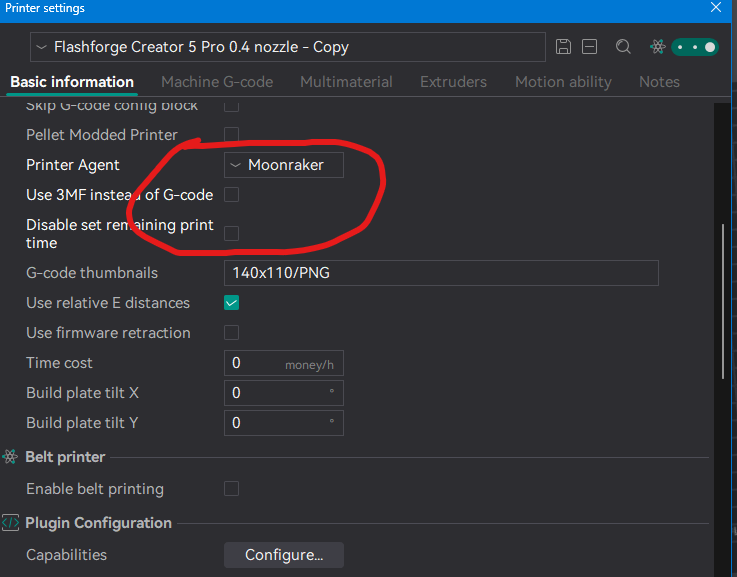
Printer settings
- Printer Agent: switch to
Moonraker. - Use 3MF instead of G-code: switch from
ontooff. - Disable set remaining print time:
off.
3MFs
.gcode.3mf files will get automatically changed to normal .gcode on upload, so to optimize file size uploading, you may use it. This has a downside of unzip / parse time being much higher, but the time you save via internet uploading could be worth it.
Machine G-code
- File header G-code: clear it (leave it empty). The FlashForge profile puts a FlashForge-style time estimate there, and Orca also copies that setting into the end of the file, where Moonraker reads it instead of the real estimate. With it in place, Fluidd and Mainsail show no slicer time estimate.
Files sliced before the change
OpenCreator's Moonraker component works around this for files uploaded from now on. Files already on the printer show no estimate until you upload them again.
- Set your start G-Code to this:
;start_gcode
SET_PRINT_STATS_INFO TOTAL_LAYER=[total_layer_count]
M140 S[bed_temperature_initial_layer_single]
M191 S[overall_chamber_temperature]
M106
M106 P2 S0 ; Center_Fresh_Air_Input_Fan_for_PLA30%_(80_0-255)
M106 S0 ; Model_Fan_(Heat_Break_Cooler_80-255)100%=255
M106 P3 S0 ; Filter_Unit_Fan_0-255(ABS=255)
G90
M83
;start_gcode end
-
Remove or comment out some G-code Print End (Newer versions of the profile):
G1 X150 Y150 E-1.2 F12000 -
Layer change G-code (optional, for timelapses): add
TIMELAPSE_TAKE_FRAMEon its own line, so Timelapse takes a frame at every layer.
Optional / niceties
Faster retractions
Set retraction and deretraction speed to 45 on all extruders. It should make it much faster, and doesn't seem to cause much stringing.
Lower Z-hop
Set Z-hop height to 0.3 on all extruders. It reduces stress on the Z axis and makes your prints slightly faster.