How to toggle features
Most OpenCreator CFW features are switches you can turn on or off, they are virtual switches that print start, print end and the rest of the firmware check. Each one keeps its setting across Klipper restarts and reboots.
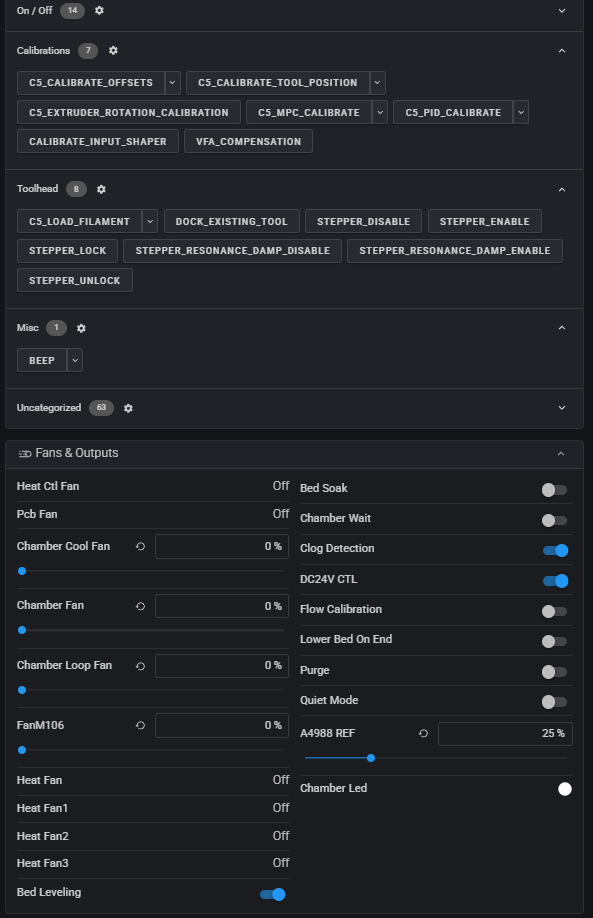
Ways to change a switch
Open the dashboard and find the Fans & Outputs card. Every switch is listed there by name.
The switches are on the dashboard under Miscellaneous.
Each switch has a pair of macros, for example C5_MISC_PURGE_ON and
C5_MISC_PURGE_OFF. In Fluidd they are grouped under Misc on the Macros
card. They print every switch's state when they finish.
Switches
| Switch | Default | Macros | What it does |
|---|---|---|---|
| flow_calibration | On | C5_MISC_FLOW_CALIBRATION_ON / _OFF |
FlashForge PA calibration, known to be extremely inaccurate. Recommended off on first setup. |
| purge | On | C5_MISC_PURGE_ON / _OFF |
Purges each prepared tool into the bucket at print start. With this and flow calibration both off, tool preparation is skipped. |
| purge_line | On | C5_MISC_PURGE_LINE_ON / _OFF |
The purge line drawn in front of the print, just before it starts. Separate from purge. |
| purge_line_all_tools | Off | C5_MISC_PURGE_LINE_ALL_TOOLS_ON / _OFF |
With purge_line on, every tool the print uses draws its own purge line at its own temperature, not only the first. Needs Kalico. See Print Workflow. |
| bed_leveling | On | C5_MISC_BED_LEVEL_ON / _OFF |
Probes a fresh bed mesh before each print. Uses KAMP if slicer settings are correct. Off loads the saved default mesh instead. |
| bed_soak | Off | C5_MISC_BED_SOAK_ON / _OFF |
Waits at bed temperature before a fresh mesh (bed_soak_minutes, 2 by default), so the plate stops warping first. Skipped below 45 °C. |
| clog_detection | Off | SET_PIN PIN=clog_detection |
Pauses the print when a tool's filament wheel stops turning while filament is loaded. If you get false positives, turn it off. |
| lower_bed_on_end | Off | C5_MISC_LOWER_BED_ON_END_ON / _OFF |
Lowers the bed to the bottom after the print, so the plate is easy to take out. |
| chamber_wait | Off | C5_MISC_CHAMBER_WAIT_ON / _OFF |
On: M191 waits for the chamber to reach temperature. Off: it sets the target and the print carries on while the chamber heats. |
| door_notify | Off | C5_MISC_DOOR_NOTIFY_ON / _OFF |
Shows a pop-up (GrumpyScreen) and beeps when a door is opened during a print, or a print starts with one open. |
| quiet_mode | Off | C5_MISC_QUIET_MODE_ON / _OFF |
Silences the buzzer for anything it uses (start / end tune, door, etc). |
| chamber_heat_fan_full (Pro) | Off | C5_MISC_CHAMBER_HEAT_FAN_FULL_ON / _OFF |
Keeps the chamber heater fan at 90% while the chamber heats, instead of slowing it near the target. |
| host_pressure_advance (PA BRANCH ONLY INDEV) | Off | C5_MISC_HOST_PRESSURE_ADVANCE_ON / _OFF |
Runs the host pressure advance test at print start, see Printer Features. |
For one print only
A switch applies to every print until you change it. To change print start
for a single job, add the setting to C5_PRINT_START in the slicer's start
G-code instead. A value there wins over the switch for that print only.
| Parameter | Overrides |
|---|---|
FLOW_CALIBRATION=0 or 1 |
flow_calibration |
PURGE=0 or 1 |
purge |
PURGE_LINE=0 or 1 |
purge_line |
PURGE_LINE_ALL_TOOLS=0 or 1 |
purge_line_all_tools |
BED_LEVELING=0 or 1 |
bed_leveling |
HOST_PRESSURE_ADVANCE=0 or 1 |
host_pressure_advance |
BUILDPLATE_CHECK=0 |
Skips the build plate check (no switch) |
For example, a print with no bucket purge and no purge line:
Note
Putting C5_PRINT_START in the start G-code replaces the one OpenCreator
builds for you, which fills in each tool's material, the used tools and the
idle temperatures from the file. Leave it out unless you need a per-print
override, see Slicer Configuration.
Changing the defaults
A switch's default is only used until you change it the first time. The
defaults are in printer.creator5.cfg (purge_default,
purge_line_default, bed_soak_default and so on). The current values are
saved in c5_misc_variables.cfg in the config folder. You shouldn't be changing
default values as it is just as easy as flicking a single switch.